
Any screenshot you've taken, back from one word.
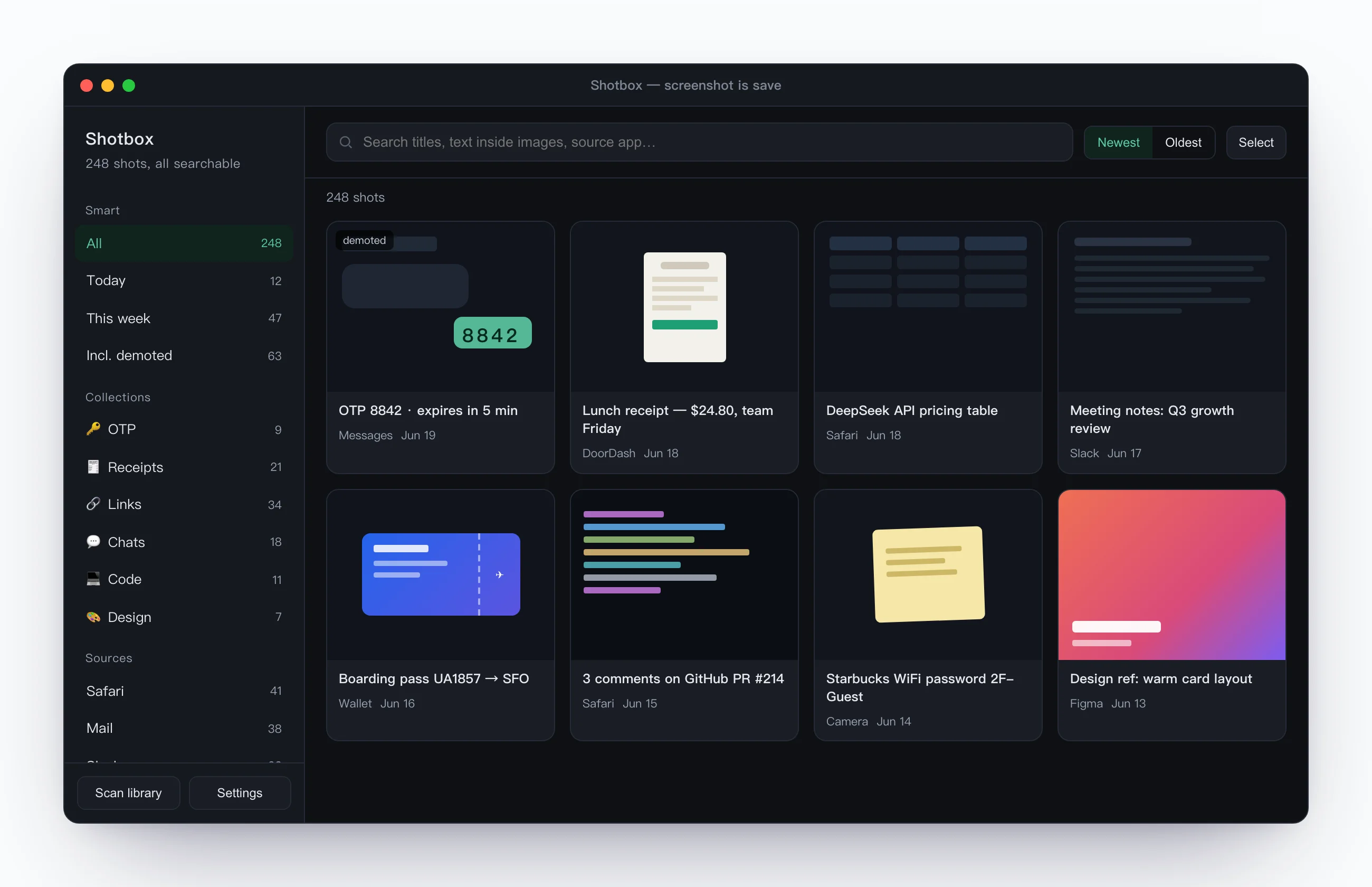
Shoot with Shotbox and it auto-reads the text on your Mac, titles each shot, and makes it Spotlight-searchable. Days later, type a few words and the original comes back with its text and source — no scrolling your photo library, no reshooting.
Or via Homebrew: brew install --cask gatheon-apps/tap/shotbox
On-device OCR
Apple Vision runs the recognition on your Mac — no servers for OCR, and it works fully offline.
No account · read-only originals
No signup, no cloud. It only reads to build the index — never modifies or deletes. Your originals are always yours to open directly.
Barely any permissions
One-click region capture asks for Screen Recording once — the permission any screen capture needs on macOS. It only reads your images, never alters them, and never asks for full-disk access.
The app sends anonymous usage stats only (never screenshots or content) — switchable off in Settings. This site uses Cloudflare analytics for page views.
The hard part of a screenshot was never taking it — it's that it sinks into your library and you never find it again. Shotbox wires the shot straight into auto-read, saved, and searchable — so one phrase brings the original back, text and all. All on your Mac.
That shot from three days ago — back from one word
Remember "aws timeout," "boarding pass," or "the $24 one" — you're searching the actual text inside the image, not a name you gave it.
- ✓Returns the original image along with its extracted text and source app
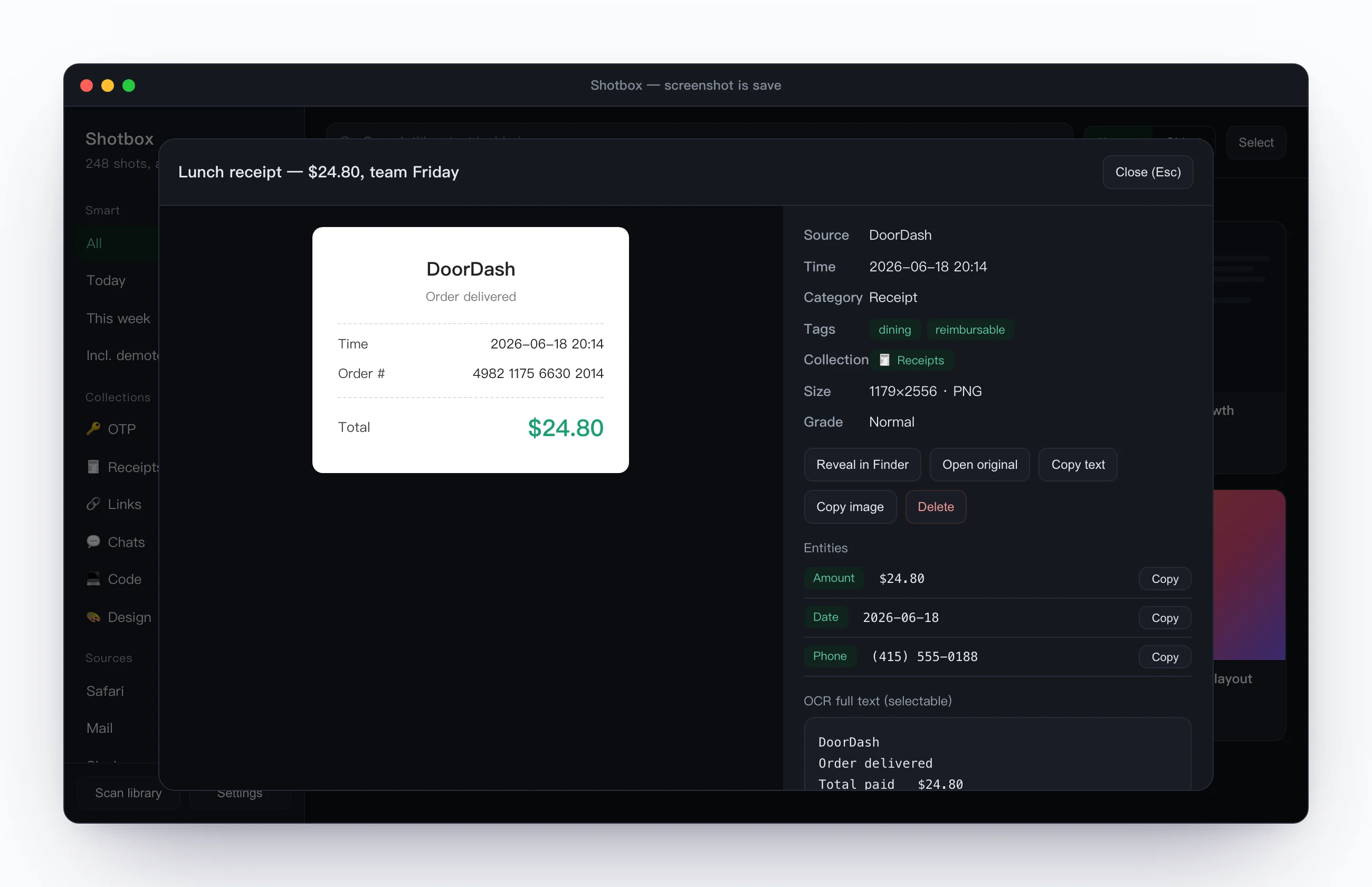
- ✓Codes, amounts, order numbers, and URLs auto-extracted as one-tap fields
- ✓No tags, no folders, no import — the index grows itself
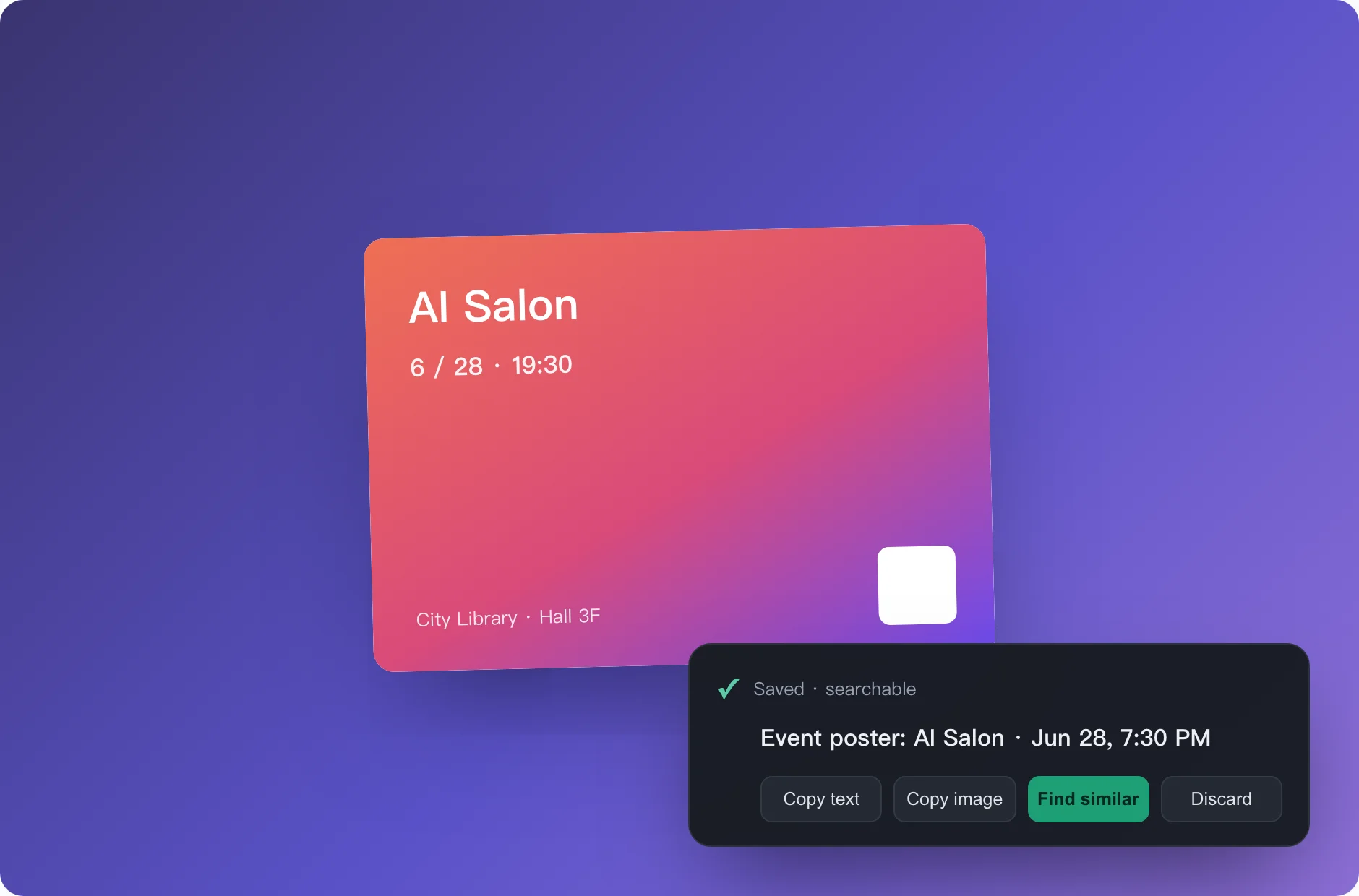
Shoot one, a receipt slides in bottom-right
- ✓A "Saved · searchable" receipt the moment it's in — you know it's kept, no need to double-check
- ✓Copy text, copy image, find similar — right there on the receipt, without breaking what you're doing
- ↓Throwaway shots swipe away in one flick — an escape hatch for clutter, so it never reaches your library
Who gets the most out of it
A swipe file for devs & creators
Errors, PR comments, API docs, commands, design references — screenshot on the fly. OCR makes code and text searchable; same-topic shots gather on their own, ready to pull in bulk when you write or debug.
Your desktop stops being a graveyard
Dozens a day piling up, never reopened — the offhand ones sink, the important ones rise. Clean desktop, nothing lost, and every shot searchable when you need it.
Receipts in a second
OTPs, order numbers, WiFi passwords, boarding passes — search a word, one-tap copy. Nothing private ever leaves the Mac.
Three steps — then forget it's there
Drag to Applications
Download, unzip and drag it into Applications. It lives in the menu bar and runs quietly in the background — install and forget.
Shoot with a hotkey
Press your custom hotkey, drag to select the region — the moment you let go it reads the text, titles it, and saves it. Zero extra steps.
Search it back in plain words
Remember one word and the original is back — along with the text inside it and where it came from, key details one tap to copy.
You might be wondering
Are my screenshots uploaded anywhere?
No. OCR, titling, and categorization all run locally on your Mac; your screenshots and the text inside them never leave the device — no account, no cloud. The app sends anonymous usage stats only (a random device ID and a few "which features got used" events, never screenshots or any content), on by default and switchable off in Settings.
What permissions does it need?
The built-in one-click region capture asks for Screen Recording once — the permission any screen capture needs on macOS. It never asks for full-disk access, and only reads your images, never altering them.
Is it free? Which Macs does it support?
Free. Runs on macOS 12 and later, Apple Silicon and Intel both. Download, unzip and drag Shotbox into Applications, done.
How do I install it?
Download, unzip and drag it into Applications, open it. It's Apple-notarized, so the first open won't be blocked by Gatekeeper.
Always improving
Once installed, every update ships through in-app auto-update — no need to come back and download.
- Scrolling capture rebuilt: frames are now sampled in-process in real time (~20 fps), so scrolling at normal speed no longer triggers a "too fast" warning; auto-scroll now stops itself once it reaches the bottom; fixed headers and footers are trimmed to a single copy; hover to select an entire window, then drag the handles to fine-tune the region; review the result section by section in a scrollable preview before saving
- Fixed broken text recognition: the 0.9.2 installer shipped without its OCR model files, so new screenshots couldn't be read or searched; the models are back and verified at build time, and the engine now falls back and logs when it fails to start. Screenshots taken during 0.9.2 won't be re-scanned automatically
- Hardening: the local API now only accepts POST and rejects cross-site requests from web pages; the unattended scrolling-capture entry point is off by default
- New hotkey action "Scrolling Capture" (⌥⌘L by default, off until enabled in Settings)
- New "Connect AI": pair AI clients such as Claude from inside the app — generate a per-client key, choose what it may access, copy the MCP / HTTP config, and review or revoke connected clients anytime. Everything stays on 127.0.0.1 and only a hash of each key is stored
- With your permission, AI can read new screenshots and clipboard items incrementally and auto-tag, categorize, collect or archive them. Every action is audited and reversible; AI can never delete items or overwrite titles and text you edited
- Updates now announce themselves: once a new version has downloaded, "Restart to update" appears at the top of the menu bar menu instead of waiting for your next relaunch
- Stability fixes: the hotkey helper now takes a lock to prevent duplicate launches; double-click wake and hotkey save failures no longer fail silently; the list refreshes right after a scrolling capture; the local web panel rejects non-local requests
- Improved update reliability with automated regression checks and reproducible dependencies for safer future updates
- Fixed an issue where the app could fail to reopen after quitting unexpectedly (crash or force quit) — no more needing to restart your Mac
- OCR engine upgraded: text extraction accuracy noticeably improved, with far fewer capitalization and spacing mistakes
- Fixed scrambled text order: extracted text now follows natural reading order, no more stray page numbers cutting into sentences
- Scrolling capture rebuilt from the ground up: a rewritten stitching engine that stays reliable on lists, tables, and sparse pages — the cases that used to break
- Capture with confidence: if you scroll too fast it tells you right away — scroll back a little and it picks up again; when you finish, preview the result before saving
- Smarter auto-scroll: slows itself down when it loses track, and says so when a window can't be scrolled; the live preview is exactly what gets saved
- Settings redesigned: grouped cards by purpose, so the option you want is one glance away
- The quick-paste panel hotkey is now customizable (Settings → Shortcuts)
- Screenshot detail actions regrouped into a tidy vertical list, with one-click copy next to the OCR text
- Quick-paste panel now slides up from the bottom of the screen — a row of cards you glance through. Press ⌃⌘; and pick
- Give any snippet its own shortcut: record a combo (e.g. ⌥⌘E) when editing, then paste it anywhere with one press — no need to open the panel
- Fixed Cmd+V paste not working in the New/Edit Snippet text fields
- Fixed snippet delete and clear-clipboard-history confirmation dialogs occasionally not responding
- New “Clipboard · Snippets” (off by default, privacy-first): save frequent text as snippets, ⌃⌘; to summon, type to search, Enter to paste
- Optional clipboard history (passwords / verification codes excluded by default)
- Screenshot grid is now full masonry — each shot shown in full; daily “suggested cleanup” for redundant screenshots
- Larger square thumbnails framed on the content — tell shots apart at a glance
- Smart thumbnail framing avoids whitespace and window chrome; refined grid cards with a subtle hover lift
- Fixed “Share…” doing nothing; thumbnails show the top-left title for easier recognition
Any screenshot you've taken, back from one word.
Free, local-first, screenshots never leave your device. Used daily as the developer's own default screenshot tool.
A few more tools from the same independent developer, all on the same local-first, findable-again principles.
Screenshot it and forget it — it comes back when you need it.

One screenshot, and the event lands in your calendar.
Auto-sorts your screenshot pile — a receipt before you delete.

Just do your work — files file themselves.
Hold to talk; real-time transcription into usable text.